What these files are
CLAUDE.md is a markdown file that Claude Code loads into its context at the start of a session. It holds what you would otherwise repeat in every prompt: how to build and test the project, where the code lives, and the rules the team follows.
AGENTS.md is the same idea as an open convention, read by a growing list of coding agents that includes OpenAI's Codex and Cursor. The format is described at agents.md. Neither file has a required schema. Both are plain markdown, and the agent treats what it reads as instructions.
That makes them some of the highest-leverage text in a repository. A wrong test command in CLAUDE.md gets run in every session until someone fixes it.
Where they live
| File | Location | Applies to |
|---|---|---|
CLAUDE.md | Repository root | Everyone on the project. Commit it. |
CLAUDE.md | A subdirectory, such as services/checkout/ | Claude Code loads it when it works with files in that directory. |
~/.claude/CLAUDE.md | Your home folder | You, in every project on this machine. |
AGENTS.md | Repository root, and optionally inside packages | Agents that follow the convention. The file nearest to the code being edited applies. |
Claude Code also reads CLAUDE.md files in the parent directories of the folder you start it in, which is handy in a monorepo. Other tools use their own filenames for the same job: .github/copilot-instructions.md for GitHub Copilot, GEMINI.md for Gemini CLI, and rule files in .cursor/rules/ for Cursor.
What goes in a good one
Good context files are short, specific and current. Write for a capable colleague on their first day, one who reads fast and takes everything literally.
Start with what the project is
Two or three sentences: what it does, the main languages, where the big pieces are. The agent can read the code. Tell it what the code is for.
Give exact commands
Install, run, test, lint, typecheck. Include the command for running a single test file, because an agent without one tends to run the whole suite. Copy commands from a terminal where they worked rather than paraphrasing them.
Map where things live
A few lines on the directories that matter, and on the ones to leave alone, such as generated code and vendored libraries.
State rules with a reason
"Never edit a migration after it merges; write a new one" is a rule an agent can follow and apply to cases you didn't list. "Be careful with migrations" gives it nothing to act on.
Point to deeper docs
Link the architecture overview and the decision records instead of pasting them in. In CLAUDE.md a line such as @docs/architecture.md imports another file. Keep the main file short enough to read in one sitting.
Update it when a mistake repeats
When the agent gets the same thing wrong twice, the fix usually belongs in this file. Review changes to it the way you review code, including the changes an agent proposes.
A sample file
This is the CLAUDE.md from the sample repo in the Markdown Library ML-42 model on our home page. The repo is fictional; the structure is one that works.
# Atlas

Storefront and checkout for Atlas Outfitters. Rails monolith in `app/`,
new services in `services/`, React front end in `web/`.

## Commands

- `bin/setup` installs everything and seeds the dev database
- `bin/dev` runs Rails, the web app and the queue worker
- `bin/rspec spec/path/to_spec.rb` runs one spec. Run the file you
  touched, not the suite.
- `pnpm --dir web typecheck` before any front-end commit

## Where things live

- `services/checkout/` is the new checkout service. The plan is in
  `plans/checkout-rewrite.md`.
- `docs/decisions/` holds the ADRs. Read the newest one for an area
  before changing it.

## Rules

- Never edit a migration after it merges. Write a new one.
- Feature flags go through `Flags.enabled?(:name, market:)`, never ENV checks.
- Money is integer cents. No floats, anywhere.

## More context

@AGENTS.md
@docs/architecture.md
What to leave out
- Secrets, tokens and internal URLs you wouldn't paste into a chat window.
- Anything a linter or formatter already enforces. Let the tool do it.
- History. "We moved off Redis in March" belongs in a decision record.
- Advice too general to change behaviour, such as "write clean code".
- Rules that contradict another file. When the root file and a subdirectory file disagree, fix one of them.
One file or two
If your team uses more than one agent, keep one source of truth. A common pattern is a complete AGENTS.md and a CLAUDE.md that imports it with a single line, @AGENTS.md. A symlink from one name to the other works too. Either way there is one file to edit and one file to review.
Keeping many of them readable
Each repo you work in grows its own CLAUDE.md, a plans folder, some decision records and the notes an agent leaves behind. Across a dozen repos that is a lot of markdown, and a code editor is a poor place to read it: the files sit between source folders, they show as raw syntax, and one project is open at a time.
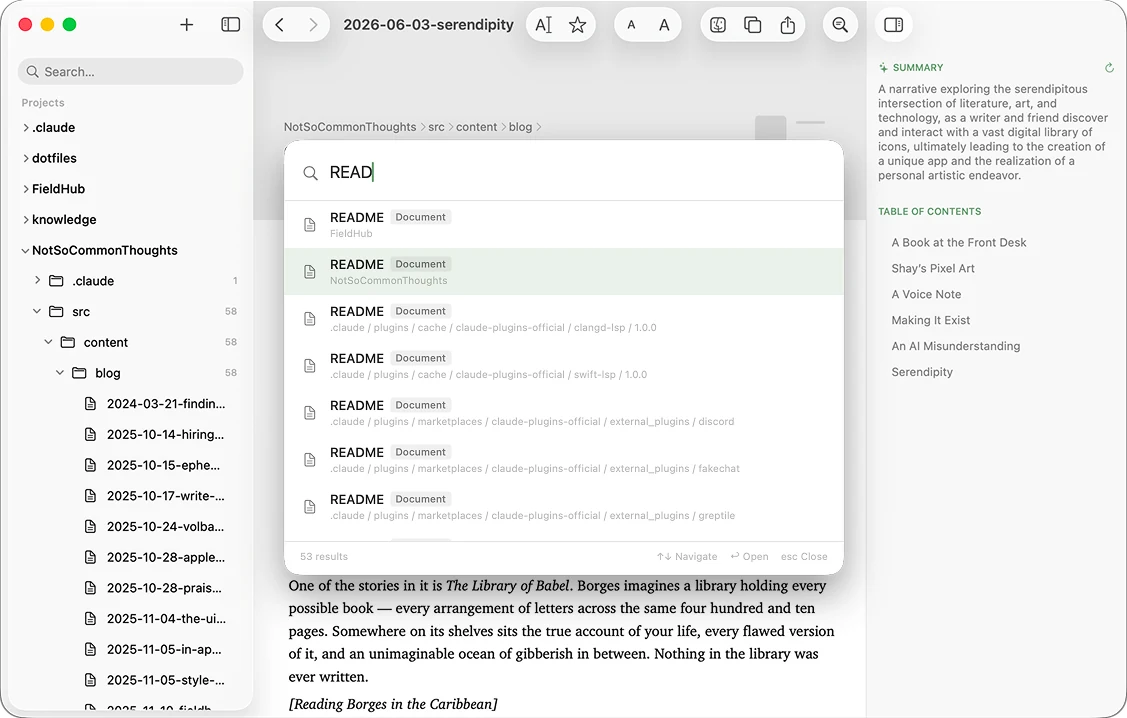
We built ML-42 for that job. Add each repo as a project, and then:
- Press ⌘K and type
CLAUDEto list every context file across all your projects, with paths. - Read them rendered, and switch to edit mode when one needs changing.
- See a one-sentence summary of each file, written on your Mac by Apple Intelligence.
- Keep a plan open while an agent works on it. When the agent writes to the file, ML-42 reloads it.

Markdown Library ML-42
A native Mac reader and editor for the markdown in your repos and docs folders. No import, no vault.
Download on theMac App Store$12.99 once. Introductory price. It goes up later.